Multilingual web testing, with your coding agent

Test how your app
behaves across languages.

Locale QA runs local Playwright, Chromium, and CDP checks on translated layouts, IME composition, Unicode persistence, user journeys, and computed accessibility—producing structured JSON reports and element crops you can re-verify after every fix.

Set up Locale QA

Copy this into your coding agent:

Your coding agent

Set up Locale QA from this checkout using npm ci && npx playwright install chromium. Start the local demo with npm run serve:demo, run Locale QA on broken.html with element crops, then verify fixed.html exits 0.

Or run this in your terminal:
npm ci && npx playwright install chromium && npm run serve:demo

Requires Node.js 22 or later. The npm package, CLI bin, and skill ID retain the name locale-layout-qa for compatibility.

Run your first check
npm run qa -- --url http://127.0.0.1:4173/broken.html --viewports 1280x800 --crop-dir qa-shots --out qa-report.json

Prefer a 42-second visual overview or a 2:30 walkthrough? Watch the product videos ↓

On this page

How it works

Translations rarely fail in one place. Locale QA gathers layout geometry, CDP font metrics, synthetic IME traces, API read-backs, and accessibility snapshots into one machine-readable report so you or your coding agent can fix the root cause and prove the result.

  1. Run a URL or scenario

    Pass a bare --url for read-only page checks, or attach --scenario-config and --ime-config for interactive flows.

  2. Inspect reproducible evidence

    Read exact rule codes, selectors, pixel budgets, element crops, and api_readback diffs instead of eyeballing pages.

  3. Fix, then re-verify

    Locale QA never edits your files automatically. You or your agent patches the code, then re-runs the same check to confirm exit 0.

See the full broken.html investigation

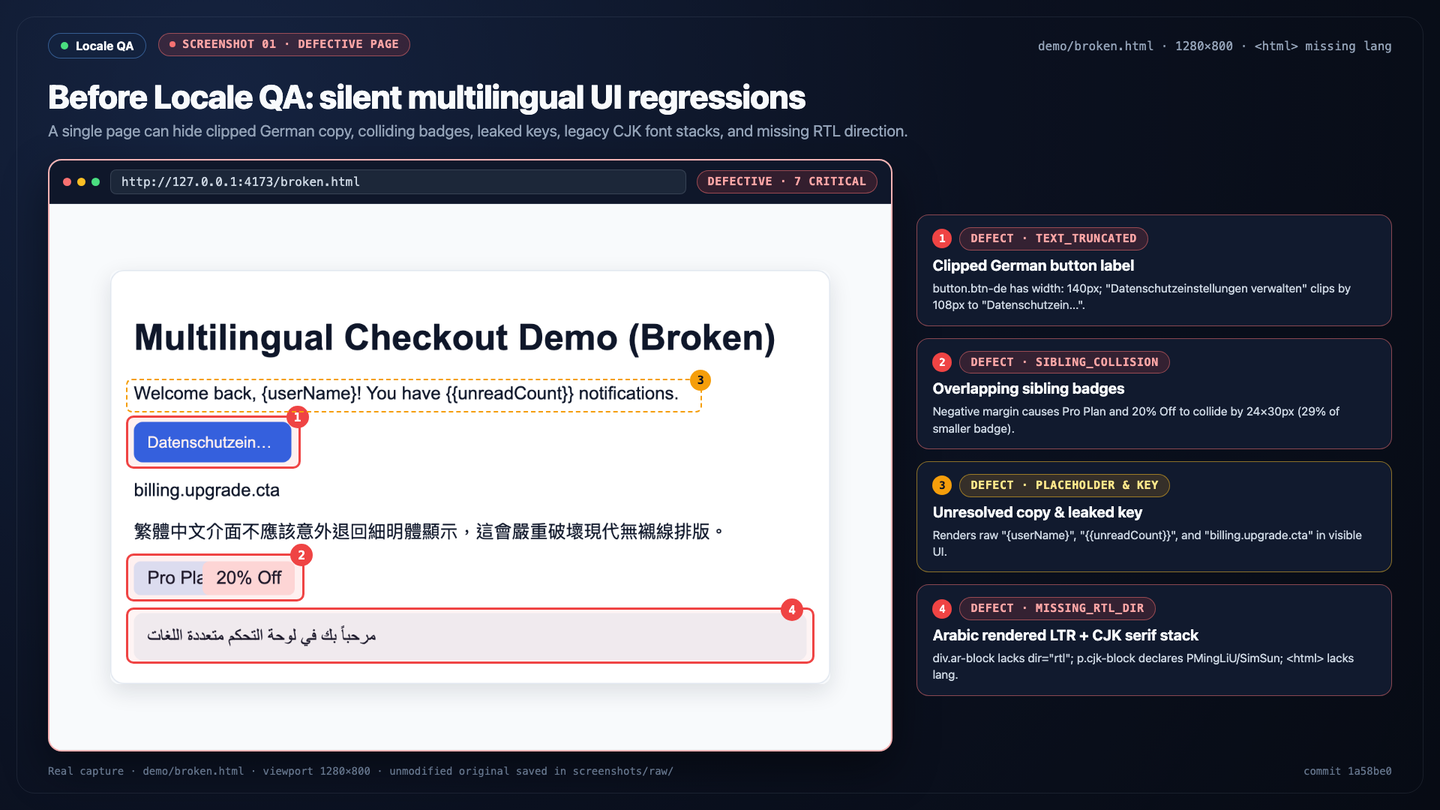
Why did broken.html fail with 7 critical findings and exit code 1 at 1280×800?

Follow the evidence step by step

qa-report.json · selected findings
{
  "id": "LLQA-001",
  "code": "TEXT_TRUNCATED",
  "severity": "critical",
  "selector": "button.btn-de",
  "pixelBudget": {
    "containerWidthPx": 140,
    "contentWidthPx": 248,
    "excessPx": 108
  }
}
{
  "code": "CJK_SERIF_FALLBACK",
  "selector": "p.cjk-block",
  "observedFont": "PMingLiU"
},
{
  "code": "MISSING_RTL_DIRECTION",
  "selector": "div.ar-block",
  "expected": "dir=rtl"
}
{
  "gate": {
    "exitCode": 1,
    "reason": "severity_threshold_exceeded"
  },
  "summary": {
    "criticalCount": 7,
    "warningCount": 0,
    "cropsSaved": 6
  }
}

Every finding links to a selector, pixel budget, or evidence source—not a vague screenshot alone.

Ask your coding agent to fix it

Example prompt · Layout repair loop

Run Locale QA on http://127.0.0.1:4173/broken.html at 1280x800 with --json. Fix every critical layout, font, placeholder, and RTL issue in the source, then re-run under the same viewport to verify exit 0.

Example result · verified re-run

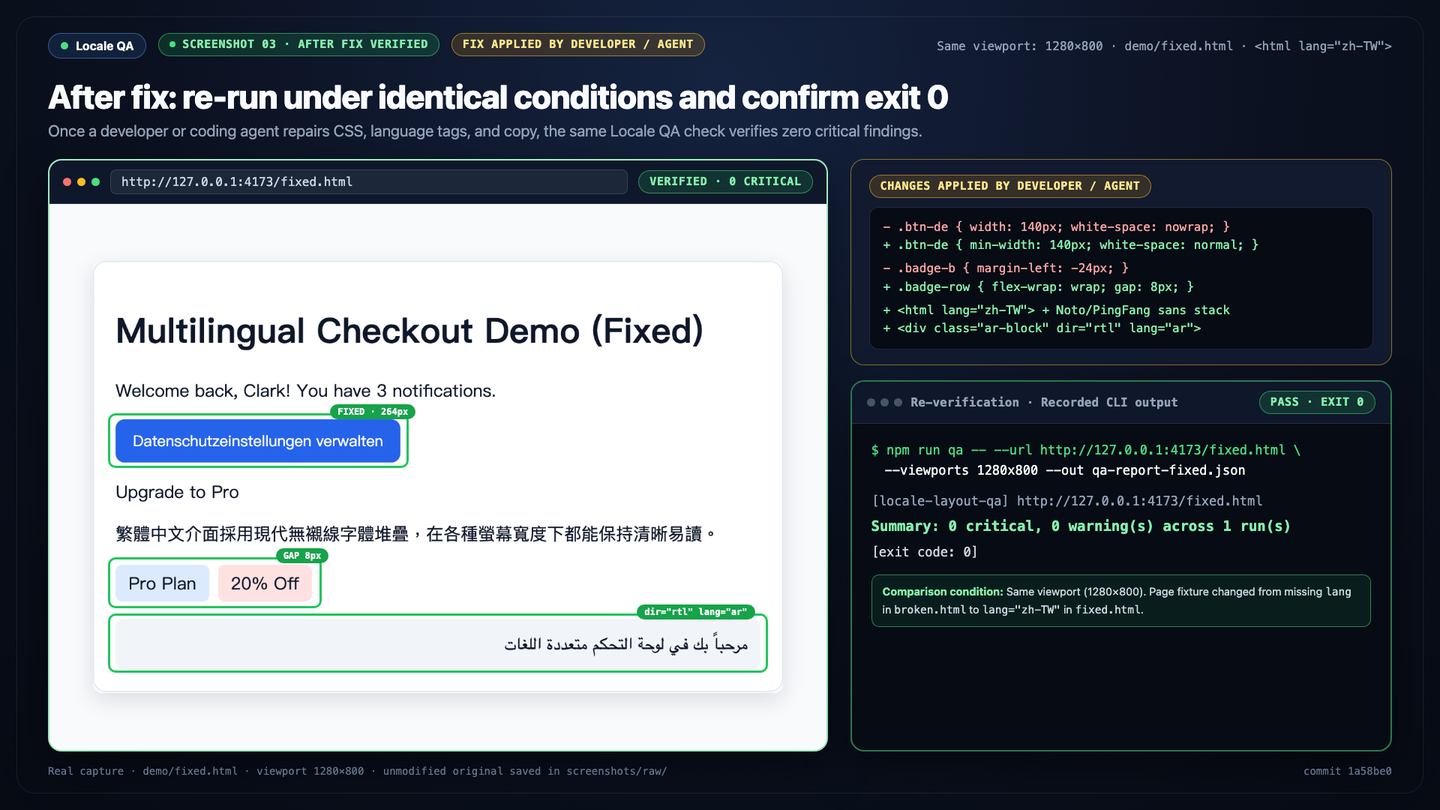
Replaced fixed width: 140px with min-width and wrapping, restored modern CJK sans stack, added dir="rtl", and resolved missing keys.

broken.html → 7 critical (exit 1)fixed.html → 0 critical (exit 0)
Locale QA supplies
Deterministic JSON findings, pixel budgets, CDP font observations, element crops, and exit gates.
Developer or agent handles
Source code edits, translation updates, and re-running the exact check to prove the regression is gone.
Evidence excerpts from Locale QA's built-in demo/broken.html and demo/fixed.html at 1280×800.

Try two real failure modes right in the browser: layout clipping after translation, then silent Unicode loss behind an HTTP 200.

Example 01 · Layout & translation integrity

Why did the German button clip?

A button that looks fine in English often overflows by 30%–75% in German or pseudo-localized strings. Test the live DOM measurement below, then inspect the real element crop from broken.html.

1. Run a direct URL check

Terminal · Direct page audit

npm run qa -- --url http://127.0.0.1:4173/broken.html --viewports 1280x800 --crop-dir qa-shots --out qa-report.json

2. Read the exact pixel budget

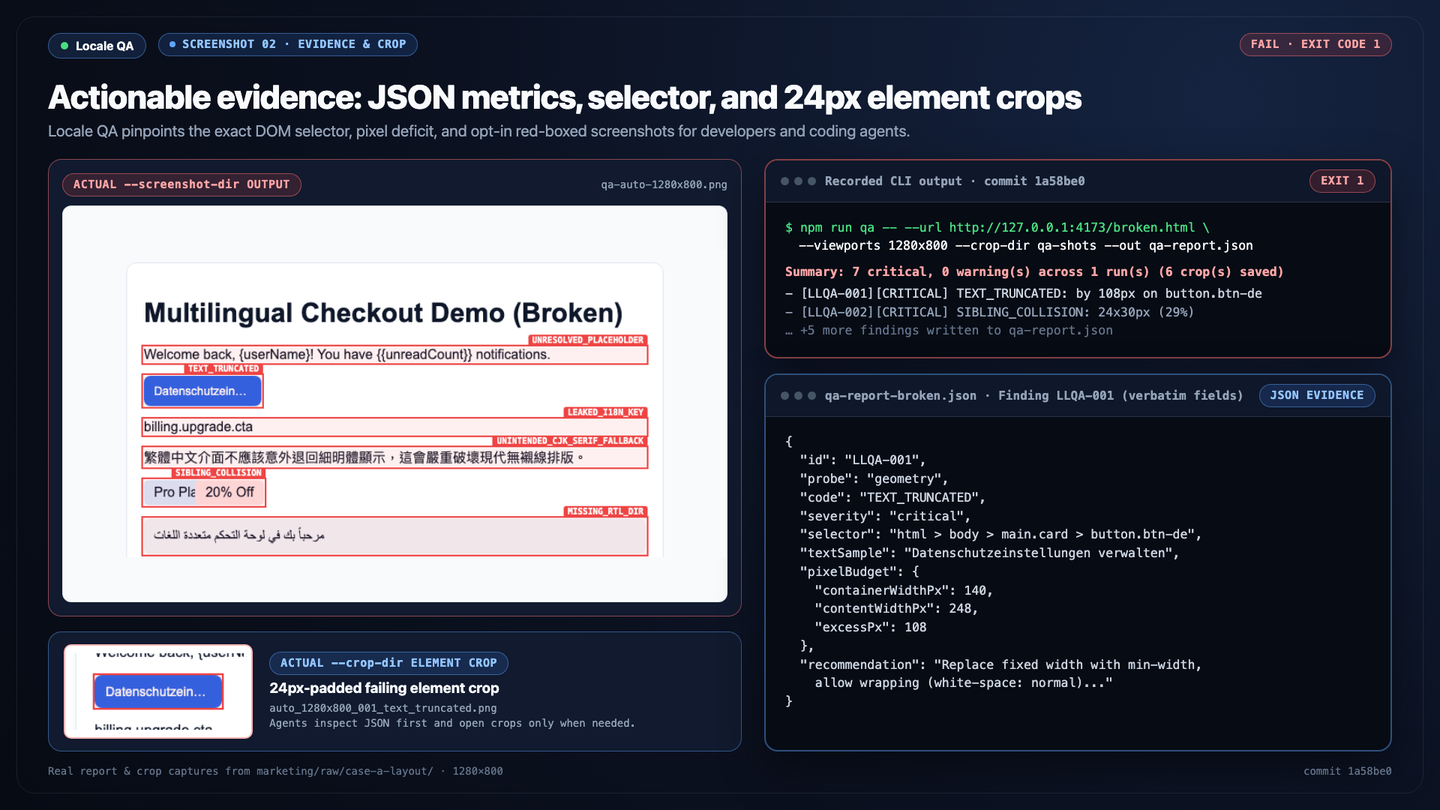
In demo/broken.html, button.btn-de locks width: 140px with overflow: hidden; text-overflow: ellipsis. English fits; German expands to 248px and truncates by 108px. Adding --pseudo-loc catches the same class of bug before translations even arrive.

3. Try the live overflow inspector

English fits inside 140px. Click German (DE) or Pseudo (+35%) to trigger real browser scrollWidth > clientWidth clipping, then switch to Fixed CSS to verify the repair.

button.btn-de · width: 140px;
Manage privacy
Measuring live DOM geometry…
Live browser measurement using actual clientWidth and scrollWidth—the same geometry Locale QA inspects via Playwright.
See the real CSS diff, element crops, and looping walkthrough
demo/broken.html · exit 1
.btn-de {
  width: 140px;
  white-space: nowrap;
  overflow: hidden;
  text-overflow: ellipsis;
}
demo/fixed.html · exit 0
.btn-de {
  min-width: 140px;
  max-width: 100%;
  white-space: normal;
  overflow-wrap: break-word;
}

How the repair loop verifies the fix

  1. 01 · Capture Run Locale QA with --crop-dir Writes 6 element crops with 24px padding and qa-report.json (exit 1).
  2. 02 · Repair Edit CSS & markup Developer or coding agent replaces fixed width, restores CJK sans stack, and adds dir="rtl".
  3. 03 · Verify Re-run at 1280×800 Confirms 0 critical, 0 warning(s) and gate.exitCode === 0.
Recorded from Locale QA running against broken.html (7 critical, exit 1) and fixed.html (0 critical, exit 0).
Annotated view of demo/broken.html showing German button clipping, sibling badge collision, leaked key, CJK serif fallback, and missing RTL
01 · Annotated defects on broken.html
Annotated Locale QA exit-1 report with magnified 24px element crop of button.btn-de and pixelBudget JSON showing 140px versus 248px
02 · Exit-1 report & 24px crop
Annotated verification of demo/fixed.html passing with 0 critical issues and exit code 0
03 · Re-run verified pass (exit 0)

Example 02 · Bug Casebook (raw-roundtrip)

Why did HTTP 200 still lose characters?

An outgoing POST returning HTTP 200 only proves the server answered—not that supplementary Han characters or ZWJ emoji survived storage. Locale QA reloads and checks api_readback directly.

1. Run the paired Casebook fixture

Terminal · Casebook broken vs. fixed

npm run qa -- --casebook broken --case raw-roundtrip --out qa-report-broken.json

2. Compare request payload vs. read-back

The same scenario assertions run against both the broken and fixed local API variants:

Outgoing request (request_payload)
Client sends valid UTF-8 and receives HTTP 200. POST /api/records → "𠮷野家 · 👩🏽‍💻 · Café" (200)
Persisted read-back (api_readback)
Broken variant drops 4-byte code points on reload. GET /api/records → "??野家 · 👩?? · Café" (exit 1)

3. Step through the round-trip

Choose a fixture and API variant, click 1. Send POST, then click 2. Read back to see why HTTP 200 is not enough.

Step 0 · Input payload ready
𠮷野家 · 👩🏽‍💻 · Café
Press 1. Send POST to submit the payload.
Waiting for submission.
Interactive model of Locale QA's raw-roundtrip, grapheme-limit, and nfc-storage Casebook assertions.
See the real JSON evidence and recorded round-trip walkthrough
qa-report-broken.json · UNICODE_TEXT_ROUNDTRIP
{
  "code": "UNICODE_TEXT_ROUNDTRIP",
  "scenarioId": "raw-roundtrip-broken",
  "step": 8,
  "evidence": {
    "source": "api_readback",
    "httpStatus": 200
  }
}
Verify the fixed variant
npm run qa -- --casebook fixed \
  --case raw-roundtrip \
  --out qa-report-fixed.json

# gate.exitCode: 0
# scenarios.coverage.unicode: passed
Recorded from --casebook broken --case raw-roundtrip (exit 1) vs. --casebook fixed (exit 0).

22-pair Bug Casebook.

Every scenario module ships with independently authored broken and fixed fixtures—started and stopped automatically on a local loopback server with identical assertions.

Full casebook docs →

Data · 8 paired cases

Localized money, decimals & DST transitions

Verify French and German decimal separators, fifth-decimal precision across focus/blur, unit conversions, leap day 2024-02-29, Kathmandu 45-minute offsets, and New York DST gaps and folds.

localized-money · focus-blur-precision · dst-gap · dst-fold

Unicode · 8 paired cases

API read-back, graphemes & global forms

Catch 4-byte Han and ZWJ emoji loss behind HTTP 200, surrogate splitting on truncation, NFC canonical search and dedup, single-part names (mononyms), international phones, and country address rules.

raw-roundtrip · grapheme-limit · nfc-storage · one-part-name

Journeys & A11y · 6 paired cases

Language switches, iframes & computed names

Verify drafts and carts survive language switches, country changes reveal required fields, embedded booking iframes follow Arabic RTL, and CDP accessible names update without object interpolation.

journey-cart-language · journey-embedded-language · a11y-dialog-focus-language

Browse all 22 paired Casebook fixtures

Showing 22 of 22 paired cases

Module Case ID Assertion / User Impact
data localized-money French and German edits, negative values, grouping separators, stored precision and EUR
data focus-blur-precision Merely reviewing a rounded display preserves the stored fifth decimal place
data percentage-scale Displayed percent value preserves the intended stored ratio
data quantity-units Changing centimetres to metres preserves the physical quantity
data calendar-leap-day 2024-02-29 survives storage across differing browser and app time zones
data instant-offset Instant near a day boundary survives rendering in Kathmandu (+05:45)
data dst-gap Nonexistent New York wall time is rejected and the prior record survives
data dst-fold Selected occurrence of a repeated New York wall time is stored accurately
unicode raw-roundtrip Mixed scripts, combining marks, supplementary Han (𠮷), and ZWJ emoji (👩🏽‍💻) survive API read-back
unicode grapheme-limit Truncation keeps connected emoji intact and catches broken surrogate boundaries
unicode nfc-storage Decomposed input is persisted in the product's declared NFC form
unicode canonical-search Canonically equivalent search strings return the same record ID
unicode canonical-duplicate Canonically equivalent tag spellings leave one persisted tag
unicode one-part-name Front end and API agree on mononym support and read back the saved name
unicode international-phone UK national and international inputs normalize to the declared canonical value
unicode address-country Switching address country updates field visibility and validation rules
journey journey-cart-language Locale preference, draft, SKU, quantity, and order survive a language switch
journey journey-country-required-region Newly required regional field becomes visible, editable, and submittable
journey journey-embedded-language Local booking iframe follows Arabic language and RTL switch and handles slot selection
a11y a11y-collection-translation-object Computed accessible name includes the visible German label instead of object interpolation
a11y a11y-validation-translation Invalid control updates its computed name, error description, and error reference in French
a11y a11y-dialog-focus-language Open dialog updates to Japanese while preserving focus target and visible text

Automate what Chromium proves. Name what stays manual.

Every report records exact coverage and evidence sources so teams never mistake a green exit code for unverified coverage.

  • Chromium-only automation: Automated probes and scenarios run in Playwright Chromium. Verify Safari (WebKit), Firefox (Gecko), and mobile browsers separately.
  • Synthetic IME vs. native OS IME: Synthetic IME scenarios dispatch scripted DOM composition events to verify web handlers. Native OS candidate windows stay manual (native: unsupported).
  • Computed a11y tree vs. screen readers: a11y checks Chromium's computed accessibility tree via CDP; spoken output in VoiceOver, NVDA, or JAWS still requires manual verification (native: manual_required).
  • Coverage before celebration: Exit 0 means configured gates passed—inspect localeCoverage, ime.coverage, and scenarios.coverage, or enforce required checks with --require-coverage.

Enforce full Casebook coverage in CI or your coding agent:

CI & Agent gate · Required coverage

npm run qa -- --casebook fixed --require-coverage data,unicode,journey,a11y --json

Exit 0: gates passed (inspect coverage) · Exit 1: severity threshold or missing required coverage · Exit 2: CLI usage, config, network, or uncaught page error.

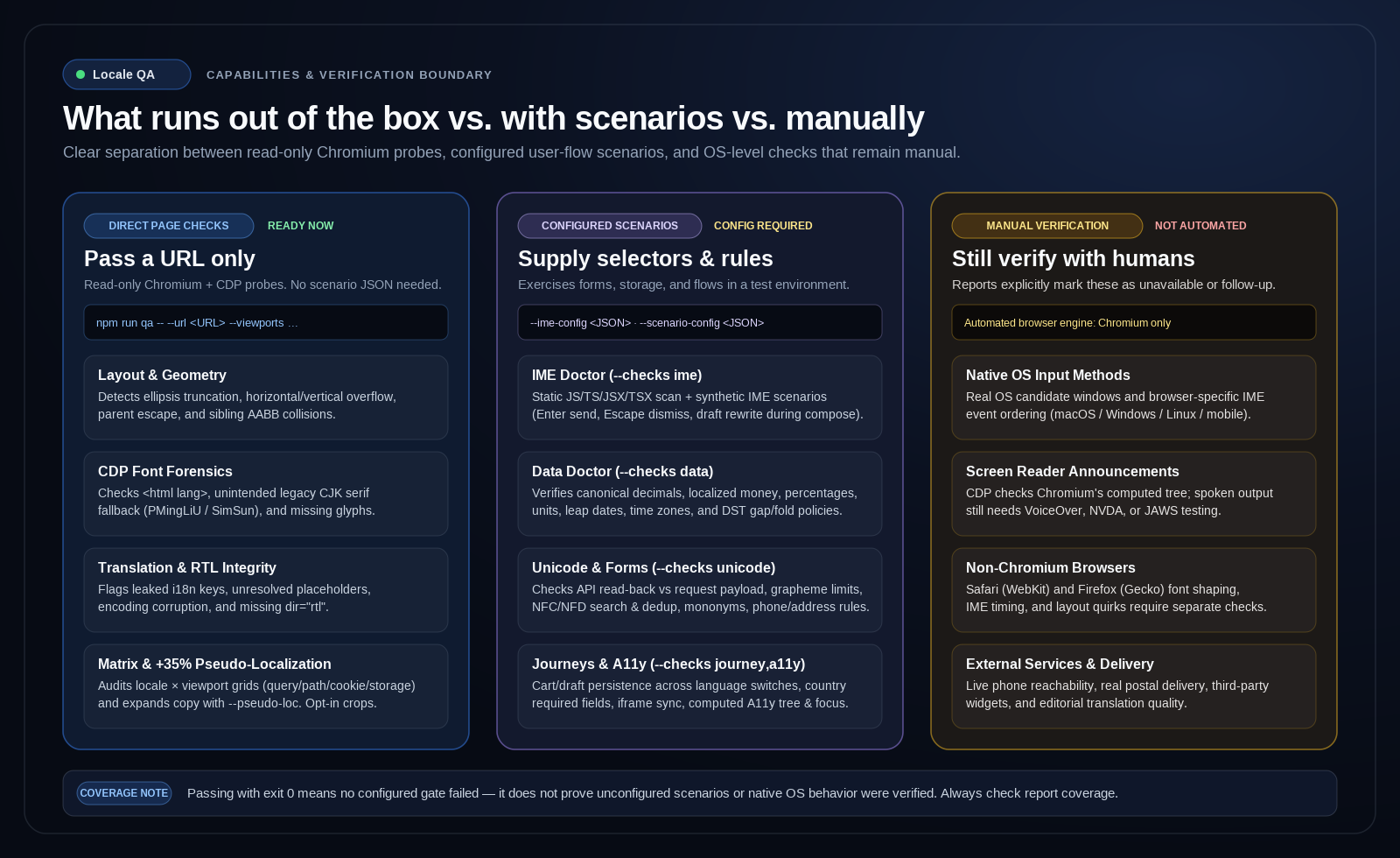
Three-column verification scope diagram separating direct read-only URL checks, configured scenario checks, and manual OS or screen-reader verification
Direct URL probes vs. configured scenarios vs. manual OS verification.

Your first check

Try Locale QA on the built-in demo.

Run broken.html (7 critical, exit 1) and fixed.html (0 critical, exit 0) locally in under two minutes, or watch the recorded walkthroughs below.

Copy setup commands ↑

Product intro (0:42)

What Locale QA catches across layouts, IME, Unicode read-back, and re-verification. Includes English and 繁體中文 captions.

Getting-started tutorial (2:30)

End-to-end terminal walkthrough: installing Playwright Chromium, auditing broken.html, reading crops, running raw-roundtrip, and confirming exit 0.

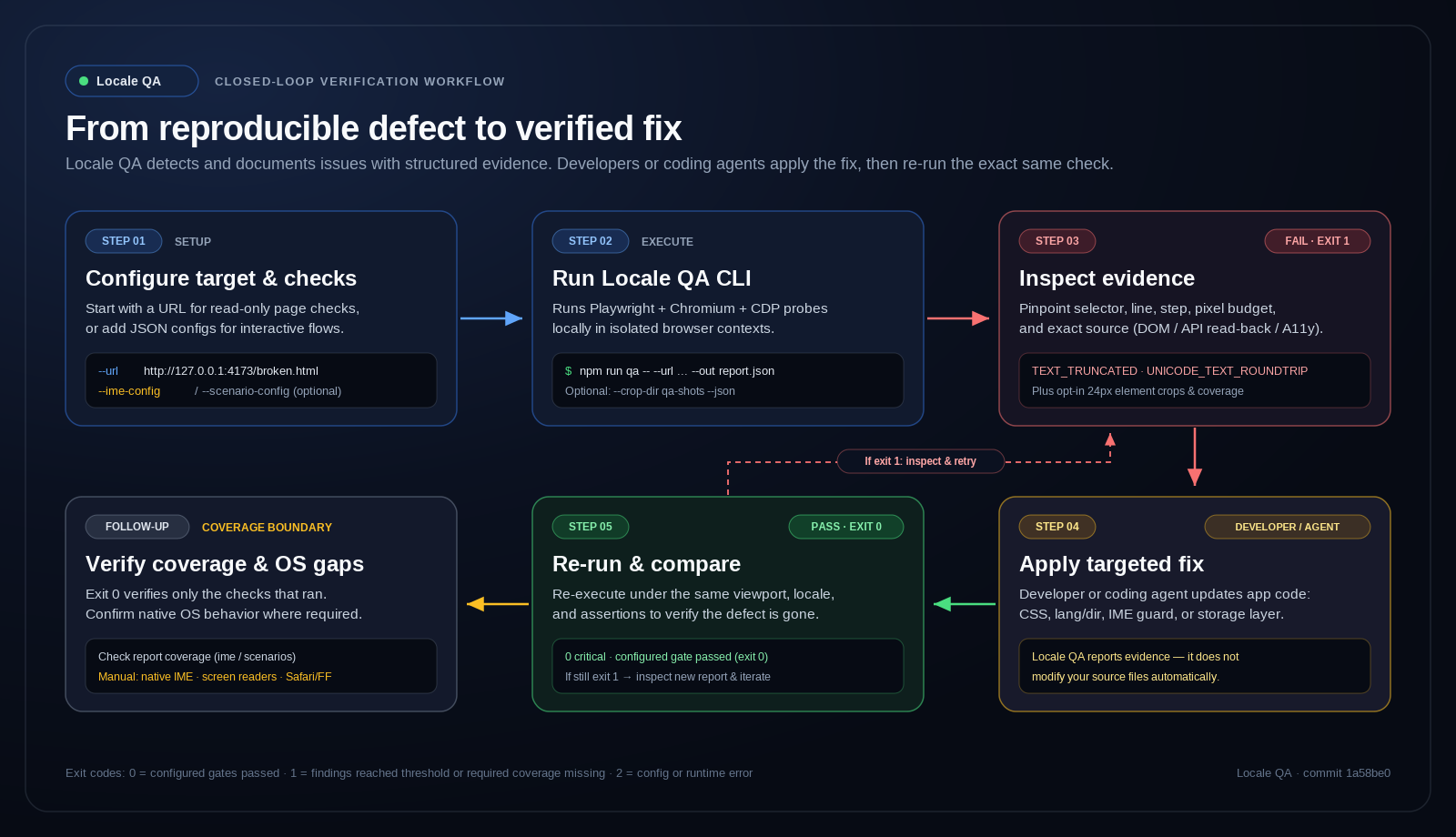
Six-step Locale QA workflow from configuring URL or scenarios to inspecting exit-1 evidence, fixing code, re-running for exit 0, and manual OS follow-up
Closed-loop verification workflow shared by human developers, coding agents, and CI pipelines.

Choose your check.

Start with read-only URL probes, then add IME and scenario configs when you need stateful coverage. Combine everything in one report with --checks all.

Layout, fonts & keys

Direct --url checks for horizontal/vertical overflow, ellipsis clipping, sibling AABB collisions, <html lang>, CJK serif fallback, leaked i18n keys, unresolved placeholders, U+FFFD corruption, and RTL direction. Add --locales and --pseudo-loc.

npm run qa -- --url … --pseudo-loc

IME & composition

Static AST scanning across JS/TS/JSX/TSX plus synthetic IME composition scenarios catching premature Enter submit, Escape modal dismissal, draft rewrites, and focus loss during CJK candidate selection.

npm run qa -- --checks ime --ime-config …

Data, Unicode, journeys & a11y

Stateful scenario checks for localized decimals, DST transitions, api_readback round-trips, grapheme limits, language-switch draft persistence, country-dependent fields, and CDP computed accessibility trees.

npm run qa -- --checks all --scenario-config …
Try more coding-agent prompts
Example prompt · Local dev app

Audit my local dev server at http://127.0.0.1:3000 with Locale QA across desktop (1280x800) and mobile (390x844), using --pseudo-loc and --crop-dir qa-shots. List every critical issue with selector and pixel budget, fix them, and re-run to confirm exit 0.

Add --ready-selector '#app-ready' if translations load asynchronously.

Example prompt · IME & Casebook check

Run the Locale QA regression suite (npm test) and inspect our keydown/input handlers with IME Doctor for unguarded Enter, Escape, or composition value rewrites. Report what was verified synthetically vs. what needs manual OS IME testing.

See SKILL.md for the closed-loop agent repair protocol.

Common questions

Does Locale QA edit my source code automatically?

No. Locale QA is strictly a verification and evidence tool. It outputs JSON findings, terminal summaries, and optional element crops so a human developer or coding agent can apply fixes and re-run the exact same check to verify exit 0.

Why are the npm package, CLI bin, and skill ID named locale-layout-qa?

The product name is Locale QA because it now covers layout, fonts, translation integrity, IME, data, Unicode, journeys, and computed accessibility. The package name, binary, and skill identifier remain locale-layout-qa so existing scripts and agent installations keep working without breaking changes.

Does exit code 0 guarantee full coverage?

No. Exit 0 means the configured gates passed. Always inspect localeCoverage, ime.coverage, and scenarios.coverage in the JSON report—or pass --require-coverage so missing or skipped modules fail with exit 1.

Do synthetic IME and CDP accessibility checks replace native OS testing?

No. Synthetic IME scenarios dispatch scripted DOM composition events to verify JavaScript event guards (native: unsupported), and a11y checks Chromium's computed accessibility tree via CDP (native: manual_required). Real OS input methods, screen readers (VoiceOver, NVDA, JAWS), Safari, and Firefox still require separate checks.

How does Locale QA handle sensitive data in screenshots and JSON reports?

Always test with synthetic data and test accounts. Screenshots are opt-in and automatically mask form controls and elements marked data-private. JSON reports redact common credential keys and support step-level redact: true, though visible page text or selected values may still appear—review reports before sharing.